 minute read
Manage Buy side and Get side on discount groups
On discount groups, Buy side / Get side is a concept that gives you great flexibility when you set up a discount.
Simply put, you can specify the following on a discount group:
-
Which articles* trigger the discount. We call that the Buy side because those articles are what customers need to buy to get the discount.
-
Which articles* get the discount. We call that the Get side.
* In addition to articles, discount groups also support discounts on discount families, article groups, departments, article lists, labels, and combinations thereof. All can use the Buy side / Get side concept.
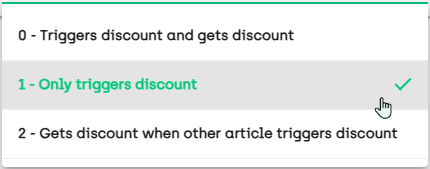
For each article* that you add to the discount group in ViKING Store Management, you can specify if the article* should:
-
Trigger the discount group's discount and also get the discount
This setting is useful in many contexts, but especially if your discount only covers a single article* (example: Buy five bottles of milk and get 50% discount)
-
Only trigger the discount
-
Only get the discount when another article* in the discount group triggers the discount
Usage scenarios
Some suggestions for how you can use the Buy side / Get side concept in discount groups (there are of course countless more scenarios):
-
Discount groups with mix discount:
-
Discount amount (example from supermarket: Buy four bananas and get EUR 2 discount on cookies)
-
Discount percent (example from footwear store: Buy any two pairs of shoes and get 50% discount on up to four pairs of socks)
-
Percent of cheapest (example from quick service restaurant: Buy four soft drinks and get 50% discount on the two cheapest burgers)
-
Percent of most expensive (example from beauty store: Buy two suncare products and get 25% discount on the two most expensive travel accessories)
-
-
Discount groups with amount discount:
-
Discount amount (example from DIY store: Buy for minimum EUR 100 of garden furniture and get EUR 25 discount on bathing pools
-
Total price (example from quick service restaurant: Buy for minimum EUR 10 of burgers and get a giant sundae for EUR 0,50)
-
Discount percent (example from beauty store: Buy for minimum EUR 100 of skin care articles and get 20% discount on fragrances)
-
If you use the Fiftytwo Master Data API to handle your discount groups, be aware that the API doesn't support discount baskets on the Get side. A discount basket is when the discount group's discount type is set to match discount).
Simple Buy side / Get side example
Let's look at a very simple example from a mix discount that covers two articles and grants a percentage discount:
If the customer buys a box of chocolates, they'll get 50% discount on a coffee to go
-
In the example, the box of chocolates is what the customer needs to buy to trigger the discount, so the box of chocolates is on the Buy side
-
The coffee is what the customer will get the discount on when the discount is triggered by the box of chocolates, so the coffee is on the Get side
So in the example, the customer will simply get their coffee at half of its usual price.
Buy side / Get side discount distribution
With Buy side / Get side, you also have the flexibility to decide how the discount should be distributed across the articles that the customer buys from the discount group.
In ViKING Store Management you handle discount distribution on the discount group's Advanced tab, with the setting Limited distribution. It has four options:
-
Distribute discount on all articles (this is the default)
-
Limited discount distribution (not relevant in a Buy side / Get side context)
-
Distribute discount on Buy side articles
-
Distribute discount on Get side articles
When the discount is triggered that means that you can distribute the discount on:
-
All articles that you sell to the customer from the discount group
-
Only on articles that you sell to the customer from the discount group's Buy side: Buy
 Get
Get 
-
Only on articles that you sell to the customer from the discount group's Get side: Buy
Get
Simple discount distribution example
If we go back to the simple Buy side / Get side example with the box of chocolates and the coffee, the fact that the coffee is on the Get side doesn't necessarily mean that you as the retailer want to distribute the discount solely on the coffee. Let's try to sell the box of chocolates and the coffee with the three different types of discount distribution:
-
Distribute the discount on all articles that you sell to the customer from the discount group
With this option the 50% discount on the price of the coffee is distributed proportionally across the two articles:
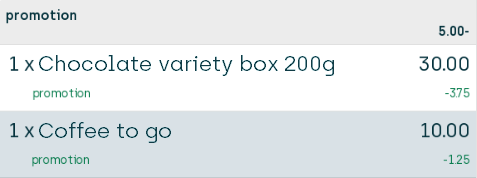
This is the default setting, so this type of distribution is what you'll get on discount groups if you don't actively select another distribution.
-
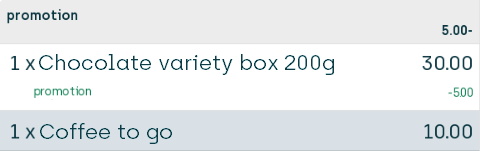
Distribute the discount only on articles that you sell to the customer from the discount group's Buy side (in our example that's the box of chocolates because you needed to buy a box of chocolates to trigger the discount)
With this option the 50% discount on the price of the coffee is distributed solely on the box of chocolates:
-
Distribute the discount only on articles that you sell to the customer from the discount group's Get side (in our example that's the coffee)
With this option the 50% discount on the price of the coffee is distributed solely on the coffee itself:
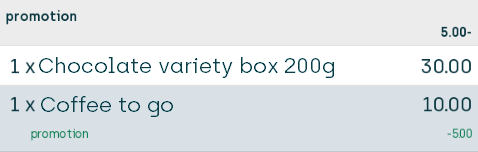
Note that each option ensures that the customer saves 5.00, so they end up saving 50% on the price of their coffee that normally costs 10.00 irrespective of which distribution method you use.
However, the fact that the discount distribution is different for each option can be important, for example if the customer later wants to return their box of chocolates and get a refund (which would then amount to 26.25, 25.00, and 30.00 respectively in the three scenarios).
More Get side / Buy side setup & discount distribution examples
The following list of examples is not exhaustive. There are many other ways in which you can use Buy side / Get side and the associated discount distribution methods. Ask your Fiftytwo consultant if you're in doubt.
Mix discount, discount percent
If the customer buys a lawn mover from the Buy side, they'll get 25% discount on a pack of grass seeds from an article list on the Get side
 View discount group setup & effect
On the discount group's General tab, we specify the following:
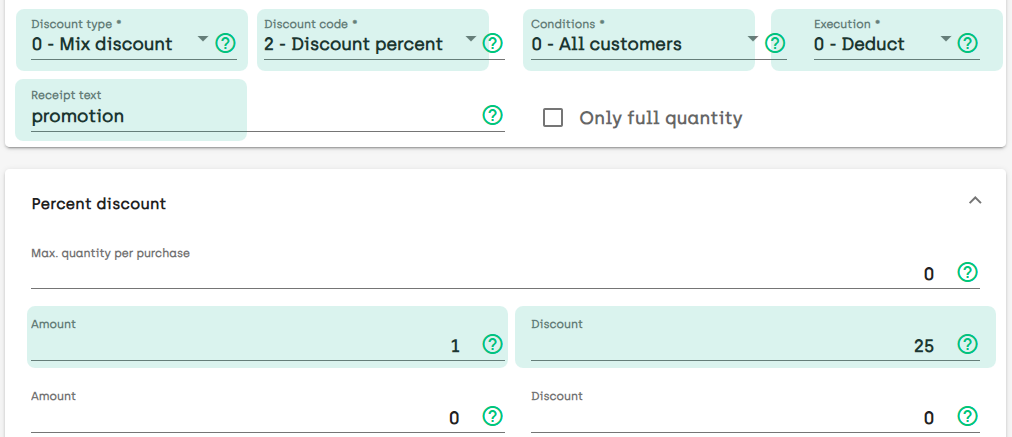
This will ensure that customers are able to mix articles, and when they buy certain articles from the Buy side it'll trigger a 25% discount on the Get side.
Now we need to specify which articles the discount group should cover.
So, on the discount group's Articles tab, we add the Lawn Mover article and specify that it'll only trigger the discount (so it'll be on the Buy side). We then add a Grass seeds article list, and specify that articles from that list will get the discount when the discount is triggered (so they'll be on the Get side):

Now let's try to sell the following:
-
a lawn mover
- and -
-
two different packs of grass seeds from the article list
and view the results of the three different discount distribution options on the POS's journal.
Result with discount distribution across all articles (default)
We begin by using the discount distribution that's defined on the article group's Advanced tab by default. That is with Limited discount distribution set to Distribute discount on all articles.
When we sell the articles on the POS, the journal looks like this:
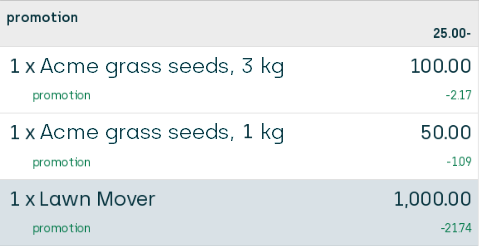
The 25% discount is given on one article. ViKING always attempts to give the customer the best deal, so it gives the discount on the most expensive of the two packs of grass seeds, that is the pack that costs 100.00. That means that the customer's 25% discount will amount to 25.00, and the 25.00 discount is then distributed proportionally across all three articles.
Result with discount distribution on articles from Buy side
In Store Management we now change the article group's Limited discount distribution setting to Distribute discount on Buy side articles.
When we sell the articles on the POS, the journal looks like this:
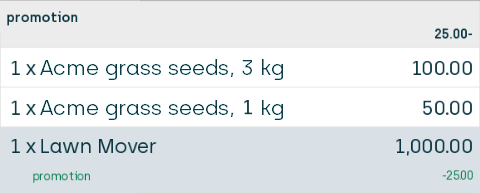
The 25% discount on the most expensive of the two packs of grass seeds is now distributed solely on the lawn mover from the Buy side, but the amount that the customer saves is the same: Their discount still amounts to 25% of 100.00, which is 25.00.
Result with discount distribution on articles from Get side
In Store Management we now change the article group's Limited discount distribution setting to Distribute discount on Get side articles.
When we sell the articles on the POS, the journal looks like this:
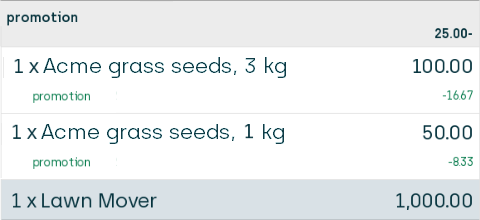
The 25% discount on the most expensive of the two packs of grass seeds is now distributed solely on the two packs of grass seeds from the Get side, but the amount that the customer saves is the same: Their discount still amounts to 25% of 100.00, which is 25.00.
Mix discount, discount percent with discount ladder
If the customer buys a certain quantity of apples from the Buy side, they'll get a percentage discount on bananas from the Get side, and the percentage discount will increase the more apples the customer buys
View discount group setup & effect
On the discount group's General tab, we specify the following:
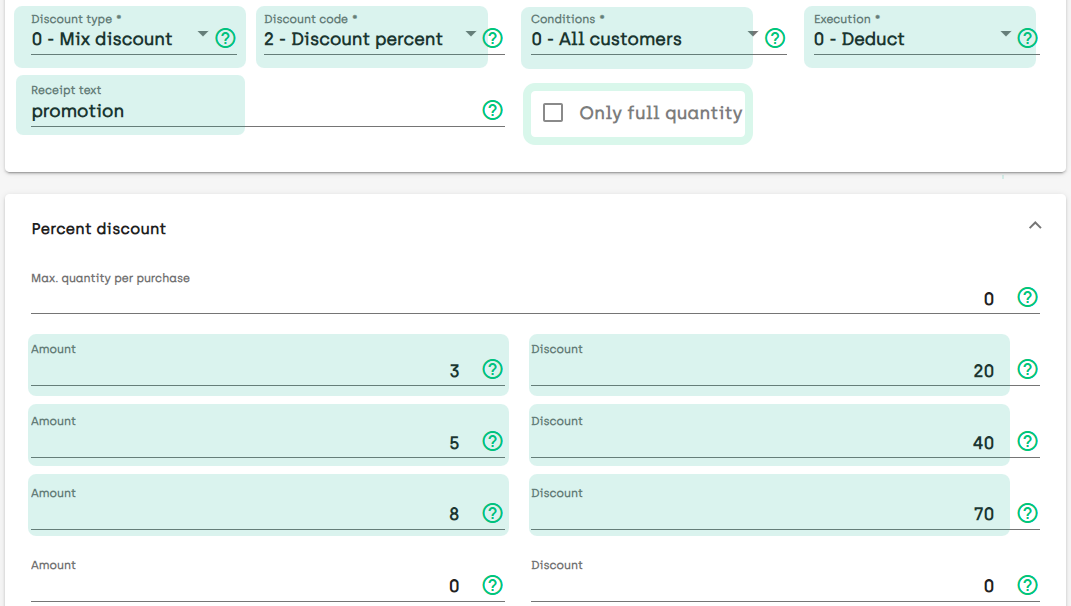
This will ensure that customers are able to mix articles, and when they buy from three to four of those articles it'll trigger a 20% discount. If the customers buy from five to seven articles it'll trigger a 40 percent discount, and if they buy eight articles it'll trigger a 70% discount.
Note the setting Only full quantity. It's used for deciding if the discount should only be triggered each time a multiple of the discount-triggering quantity is registered, or if it should continue proportionately for further quantities when a discount-triggering quantity has been reached once. When we look at the effect of our configuration, we'll look at the effect both with and without Only full quantity selected.
Before we look at the effect, however, we need to specify which articles the discount group should cover.
So, on the discount group's Articles tab, we add the Apple article and specify that it'll only trigger the discount. We then add the Banana article, and specify that it'll get the discount when the discount is triggered:

Now let's sell various quantities of apples from the Buy side and bananas from the Get side and view the effect in a table:
|
Customer buys |
Quantity sold from Buy side |
Quantity sold from Get side |
Result with Only full quantity selected |
Result with Only full quantity cleared |
|---|---|---|---|---|
|
2 apples (from Buy side) |
2 |
0 |
No discount |
No discount |
|
2 apples (from Buy side) |
2 |
10 |
No discount |
No discount |
|
3 apples (Buy side) |
3 |
10 |
20% discount on 3 bananas (Get side) |
20% discount on 3 bananas (Get side) |
|
4 apples (Buy side) |
4 |
10 |
20% discount on 3 bananas (Get side) |
20% discount on 4 bananas (Get side) |
|
5 apples (from Buy side) |
5 |
10 |
40% discount on 5 bananas (Get side) |
40% discount on 5 bananas (Get side) |
|
7 apples (Buy side) |
7 |
10 |
40% discount on 5 bananas (Get side) |
40% discount on 7 bananas (Get side) |
|
17 apples (Buy side) |
17 |
10 |
70% discount on 10 bananas (Get side) |
70% discount on 10 bananas (Get side) |
|
17 apples (from Buy side) |
17 |
17 |
70% discount on 16 bananas (Get side) |
70% discount on 16 bananas (Get side) |
Mix discount, percentage of cheapest
If the customer buys four articles from the Buy side, they'll get a 75% discount on the two cheapest articles from the Get side
View discount group setup & effect
On the discount group's General tab, we specify the following:
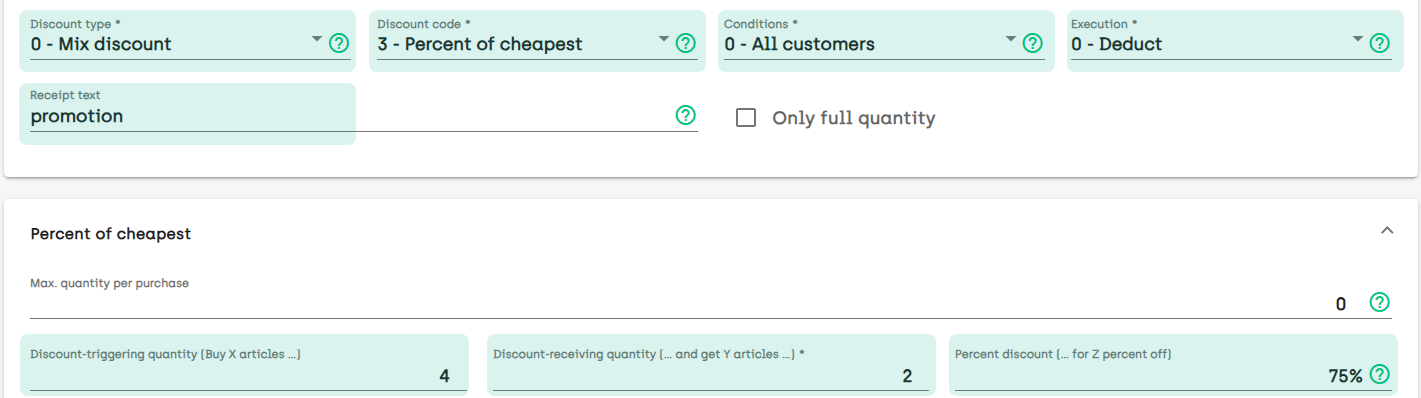
The discount group covers multiple articles, but in this example its only relevant for you to remember that:
-
one of the Buy side articles is a lip balm
-
some of the Get side articles are a jar of face cream and a bottle of shampoo, and the shampoo is the cheaper of the two
The customer must buy four articles from the Buy side to trigger the discount, so let's sell four lip balms from the Buy side and some differently priced articles from the Get side to view the results of our different discount distribution options on the POS's journal.
Result with default discount distribution (across all articles)
We begin by using the discount distribution that's defined on the article group's Advanced tab by default. That is with Limited discount distribution set to Distribute discount on all articles.
When we sell the articles on the POS, the journal looks like this:
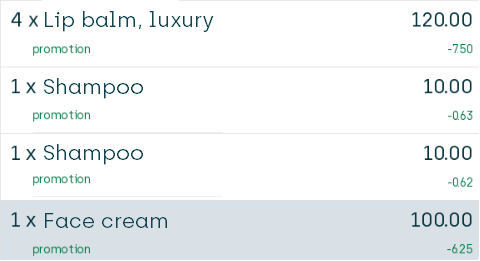
The 75% discount is given on the two cheapest articles on the Get side, that is the two bottles of shampoo. They each normally cost 10.00, so the customer will save 7.50 on each shampoo.
Because the customer buys two bottles of shampoo, the customer's discount will amount to 15.00, and the 15.00 discount is then distributed proportionally across all seven articles (with a little bit of rounding in order to reach a 15.00 discount exactly, which is why the discount on the two bottles of shampoo is 0.63 and 0.62 respectively).
Result with discount distribution on articles from Buy side
In Store Management we now change the article group's Limited discount distribution setting to Distribute discount on Buy side articles.
When we sell the articles on the POS, the journal looks like this:
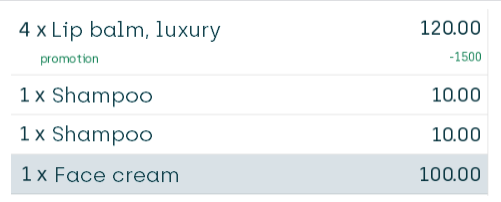
The 75% discount on the two cheapest articles, that is the two bottles of shampoo, is now distributed solely on the lip balms from the Buy side, but the amount that the customer saves is the same: Their discount still amounts to 75% of 2×10.00, which is 15.00.
Result with discount distribution on articles from Get side
In Store Management we now change the article group's Limited discount distribution setting to Distribute discount on Get side articles.
When we sell the articles on the POS, the journal looks like this:
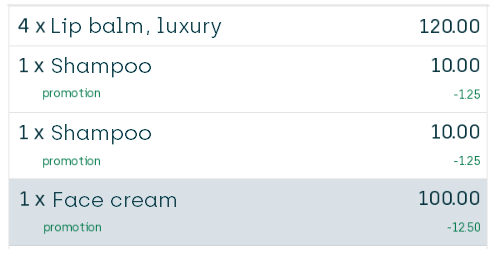
The 75% discount on the two cheapest articles, that is the two bottles of shampoo, is now distributed solely on the shampoo and face cream from the Get side, but the amount that the customer saves is the same: Their discount still amounts to 75% of 2×10.00, which is 15.00.
Amount discount, discount amount
If the customer buys for minimum EUR 100 of articles from the Buy side, they'll get EUR 25 discount on the total price of articles that they buy from the Get side
View discount group setup & effect
On the discount group's General tab, we specify the following:
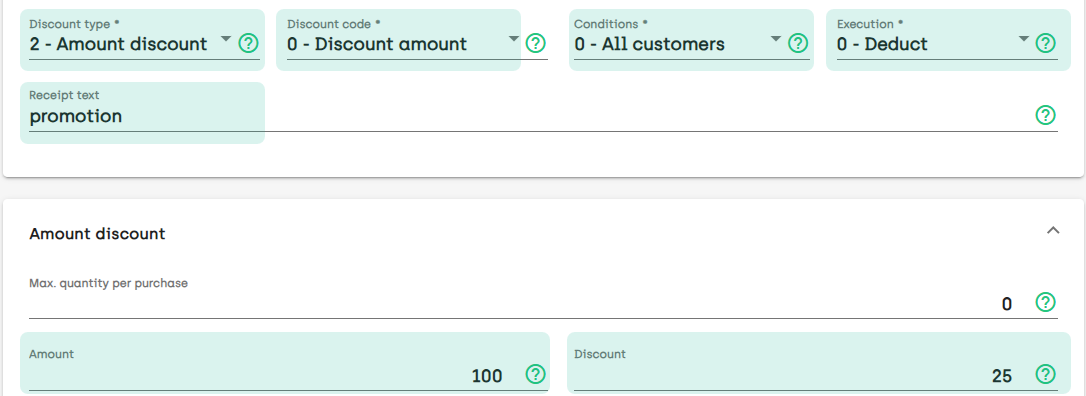
We then add a lip balm article to the discount group's Buy side, and a number of articles, including a face cream article, to the discount group's Get side.
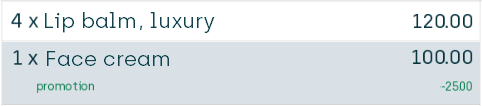
When the customer buys for more than 100.00 of lip balms from the Buy side, they'll get a 25.00 discount on the total price of the articles that they buy from the Get side (that is the face cream in this example):
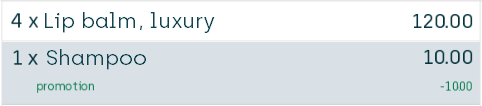
If the total price of the customer's Get side articles is less than 25.00, the entire total price of the Get side articles is deducted:
We won't look into the various ways of distributing discounts in this example. If you're interested in discount distribution methods, see the previous examples.
Amount discount, total price for N units
If the customer buys for minimum EUR 100 of articles from the Buy side, they can get an article from the Get side for a special low price of EUR 15
View discount group setup & effect
On the discount group's General tab, we specify the following:
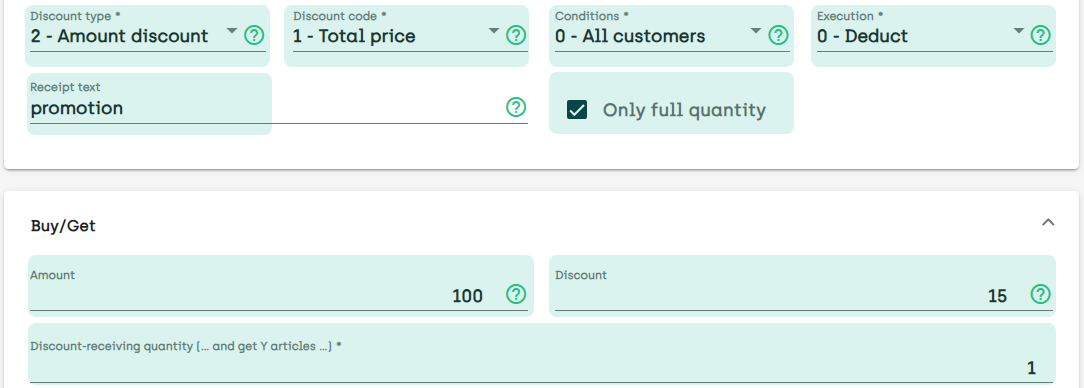
We then add a number of gardening articles to the discount group's Buy side, and a wheelbarrow to the discount group's Get side.
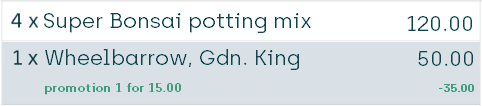
Now, when the customer buys for more than 100.00 of gardening articles from the Buy side, they're able to get one wheelbarrow from the Get side for 15.00 as opposed to its normal price of 50.00, which is a saving of 35.00:
We won't look into the various ways of distributing discounts in this example. If you're interested in discount distribution methods, see the previous examples.
For more advice on the use of Get side / Buy side and discount distribution methods on discount groups, contact your Fiftytwo consultant.
© 2026 Fiftytwo A/S • Disclaimer
Last update: 29 May, 2026 12:21:08 CET
Share this page with your colleagues: