 minute read
Buy side and Get side in discount groups
 By Morten Müller
Senior Technical Communications Specialist
Fiftytwo
23 February, 2026
On discount groups in ViKING we're introducing a new concept that gives you even greater flexibility when you set up a discount. The concept introduces the terms Buy side and Get side. With that concept you also get more freedom to decide how you want to distribute discounts across articles, but let's begin with the basics.
Simply put, you can now specify the following on a discount group:
-
Which articles* trigger the discount. We call that the Buy side because those articles are what customers need to buy to get the discount.
-
Which articles* get the discount. We call that the Get side.
* In addition to articles, discount groups also support discounts on discount families, article groups, departments, article lists, labels, and combinations thereof. All can use the Buy side / Get side concept.
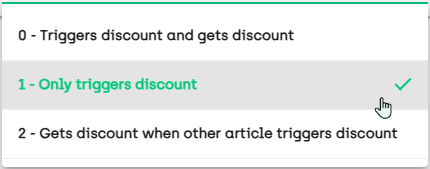
For each article* that you add to the discount group in ViKING Store Management, you can specify if the article* should:
-
Trigger the discount group's discount and also get the discount
-
Only trigger the discount
-
Only get the discount when another article* in the discount group triggers the discount
Usage scenarios
Some suggestions for how you can use the Buy side / Get side concept in discount groups (there are countless more scenarios):
-
Discount groups with mix discount:
-
Discount amount (example from supermarket: Buy four bananas and get EUR 2 discount on cookies)
-
Discount percent (example from footwear store: Buy any four pairs of shoes and get 50% discount on up to four pairs of socks)
-
Percent of cheapest (example from quick service restaurant: Buy four soft drinks and get 50% discount on the two cheapest burgers)
-
Percent of most expensive (example from beauty store: Buy two suncare products and get 25% discount on the two most expensive travel accessories)
-
-
Discount groups with amount discount:
-
Discount amount (example from DIY store: Buy for EUR minimum 100 of garden furniture and get EUR 25 discount on bathing pools
-
Total price (example from quick service restaurant: Buy for minimum EUR 10 of burgers and get a giant sundae for EUR 0,50)
-
Discount percent (example from beauty store: Buy for minimum EUR 100 of skin care articles and get 20% discount on fragrances)
-
Example
Let's look at a very simple example from a mix discount that covers two articles and grants a percentage discount:
If the customer buys a box of chocolates, they'll get 50% discount on a coffee to go
-
In the example, the box of chocolates is what the customer needs to buy to trigger the discount, so the box of chocolates is on the Buy side
-
The coffee is what the customer will get the discount on when the discount is triggered by the box of chocolates, so the coffee is on the Get side
So in the example, the customer will simply get their coffee at half of its usual price.
This is where you should stop reading if you only wanted to know the very basics of how Buy side / Get side works in its simplest form. But there's more good news ...
Buy side / Get side discount distribution
Discount groups are loved by many for their great flexibility, and Buy side / Get side is no exception: Together with the Buy side / Get side concept we're also introducing the flexibility for you to decide how the discount should be distributed across the articles that the customer buys from the discount group.
In ViKING Store Management you handle discount distribution on the discount group's Advanced tab, with the setting Limited distribution. The setting used to be a simple checkbox, but now it has four options:
-
Distribute discount on all articles (this is the default)
-
Limited discount distribution (not relevant in a Buy side / Get side context)
-
Distribute discount on Buy side articles
-
Distribute discount on Get side articles
When the discount is triggered that means that you can distribute the discount on:
-
All articles that you sell to the customer from the discount group
-
Only on articles that you sell to the customer from the discount group's Buy side: Buy
 Get
Get 
-
Only on articles that you sell to the customer from the discount group's Get side: Buy
Get
Discount distribution example
If we go back to the example with the box of chocolates and the coffee, the fact that the coffee is on the Get side doesn't necessarily mean that you as the retailer want to distribute the discount solely on the coffee. Let's try to sell the box of chocolates and the coffee with the three different types of discount distribution:
-
Distribute the discount on all articles that you sell to the customer from the discount group
With this option the 50% discount on the price of the coffee is distributed proportionally across the two articles:
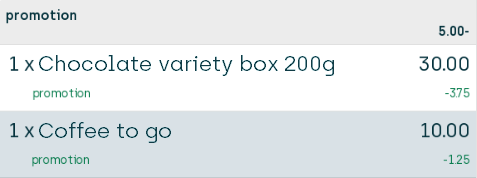
This is the default setting, so this type of distribution is what you'll get on discount groups if you don't actively select another distribution.
-
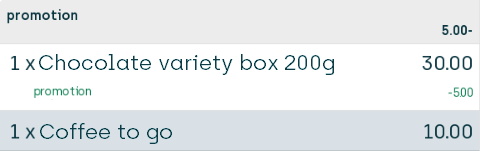
Distribute the discount only on articles that you sell to the customer from the discount group's Buy side (in our example that's the box of chocolates because you needed to buy a box of chocolates to trigger the discount)
With this option the 50% discount on the price of the coffee is distributed solely on the box of chocolates:
-
Distribute the discount only on articles that you sell to the customer from the discount group's Get side (in our example that's the coffee)
With this option the 50% discount on the price of the coffee is distributed solely on the coffee itself:
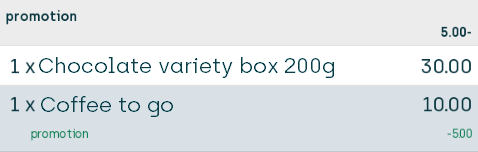
Note that each option ensures that the customer saves 5.00, so they end up saving 50% on the price of their coffee that normally costs 10.00 irrespective of which distribution method you use.
However, the fact that the discount distribution is different for each option can be important, for example if the customer later wants to return their box of chocolates and get a refund (which would then amount to 26.25, 25.00, and 30.00 respectively in the three scenarios).
Learn more
To view more examples of Get side / Buy side implementations and discount distribution scenarios, see the section More Get side / Buy side setup & discount distribution examples in the topic Manage Buy side and Get side on discount groups.
For updated general information about how to set up discount groups, see Manage discount groups in ViKING Store Management.
© 2026 Fiftytwo A/S • Disclaimer
Last update: 29 May, 2026 12:21:08 CET
Share this page with your colleagues: